Total Hit Count
Tip of The Day


How To Open Any Password Protected PDF File When You Lost Or Forgot Password
PDF is the most popularly used format for sending and receiving files on the internet. To prevent an unauthorized person from reusing or misusing the PDF documents, people, especially these PDF files creators, are likely to set passwords to protect them. However, due to bad memory or some other unpredictable reasons, they may lose PDF password and be rejected to get access to their PDF files.
Method : 1
SmartKey PDF Password Recovery Tool
It is a useful PDF file password recovery tool which is designed to find forgotten PDF document password. Using a brute force technique, this PDF password recovery tool, which owns three password attack types, will uncover your PDF document password QUICKLY and EFFICIENTLY. Here is a detailed description on how to decrypt PDF file step by step.
Step 1: Download and Install PDF Password Recovery Tool
Open your web browser and go to ‘SmartKey’ official website. Download SmartKey PDF password recovery software and install it on your computer.
Step 2: Import PDF Document that You Forgot Password for

Launch the program. In the main interface, click “Open” button to add PDF file into the PDF Password Recovery window. This program supports multilingual PDF files.
Step 3: Select One Password Attack Type

- There are three kinds of attack types for documents: brute-force attack, brute-force with mask attack and dictionary attack.
- Each of them has their own features. If you know part of the password, you can select brute-force with mask attack and click on “Options” to set the length and some tips of the password. This can speed up the password recovery process.
- Likewise, you can set parameters for each attack.
-
Step 4: Recover Forgotten PDF Password
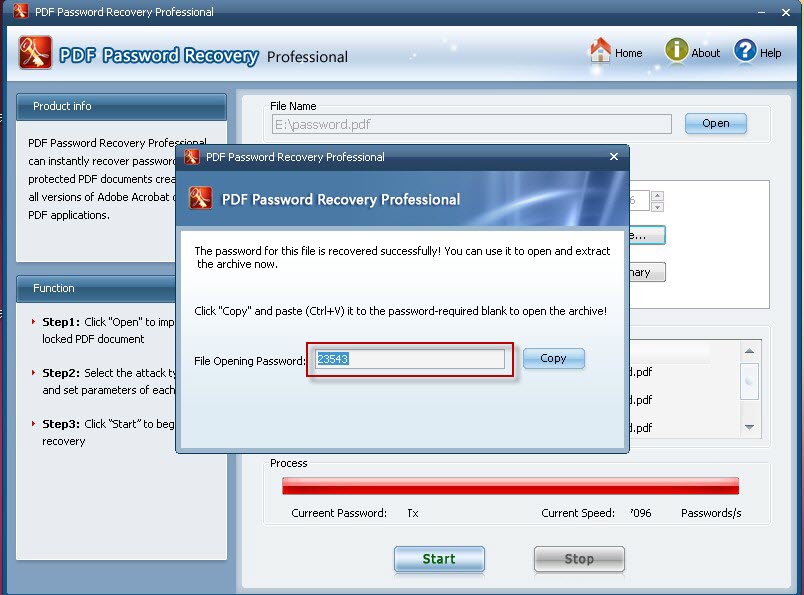
- Click “Start” button to begin the recovery. It will start the process of trying to find the PDF document password.
- Check the progress indicator to view the progress of the password attack. This could take several minutes.
- The specific time depends on the password length. The longer the password, the more time it will take.
- When SmartKey PDF Password Recovery finds the password, a screen will pop up with the password listed there.
- Copy and paste it to open your PDF file.
Method : 2
Steps To Remove Password from PDF Files:
1. First of all, you will have to open up the password protected PDF file on your Google Chrome Web browser. You can do that by just dragging and dropping the file to the Chrome browser. Enter up the password for the file and then open it up on the browser itself.
2. From the “File” menu of the Google Chrome go to the “Print” option and then select it up. This will be used to print out the file but in general, we won’t be printing it up in real. You can also simply use the key combination of “Ctrl + p” if you want.

3. You will be then prompted with a dialogue box, and from there you just have to select up from the options “Save as PDF” and then click on the Save button. Now the thing that you will have to remember is that you will have to check up the option that says “Save to Google Drive” before you press the save button.
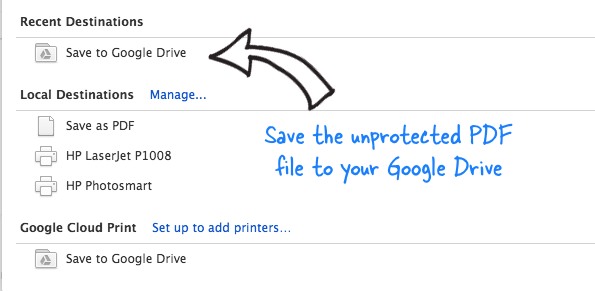
4. After all that your file will be uploaded to the Google Drive, and it can be downloaded from there. Just download the file from there and your will find that the PDF file password has been removed. You can now open up the file easily without any password.
Method : 3
Using Online Tools:
There are some of the online websites that provide up with the online tools that can quickly help you unlock your PDF files. Some of these online sites include ‘pdfunlock.com‘, ‘smallpdf.com/unlock-pdf‘. You can try to use these tools if you want to unlock your files instantly on the internet and not want to download any third party application for that very purpose.
The method is very simple, and you won’t have to go through multiple processes so as to completely remove the password encryption from the PDF files. From now onwards, you can easily remove up the password from the PDF files and hence you might not need to buy up the files but only apply the method from this article. Just go and try up this method on your PDF files that were encrypted before so as to gain access.
Method : 4
How to Crack password-protected PDF Files?
A secure PDF file enforces copyright laws with features to prevent reproduction or distribution by other users. There are basically two types of PDF protection – One is password based encryption and the other user accessibility restriction.
A) User accessibility restriction is that the original PDF creator can either restrict opening the PDF file itself or he can restrict others from modifying, printing or copying text and graphics from the PDF file.
Simply put, “user” password protection and “owner” password protection. First one prevents opening a document without knowing the password. The second protects information in a document from being printed, copied or edited.
(i) When you can view the pdf but there are Copying or Printing Restrictions
Removing this type of “protection” is easiest because the security entirely depends on the pdf reader to honor those limitations. You can always use custom pdf readers which do not honor the restrictions. There is also a number of tools available online which can remove such restrictions on the file.
If you need to edit or copy text from a PDF file, but don’t have access from the owner, follow these steps to unlock the PDF file.
- Open the document in Acrobat Reader and capture the PDF page as an image using any free screen capture software.
- If you want to copy just a portion of text from some PDF page, use a screen capture tool with OCR features.
- Alternatively, you can use commercial solutions like Advanced PDF Password Recovery or PDF Password Remover.
- These utilities may not recover the password for you – they’ll just remove the restrictions from the password protected file.
(ii) When there are Document Opening Restrictions.
This is a very tricky case and there’s no straight-forward solution to read PDF documents that are password-protected at the Open level.
Advanced PDF Password Recovery Professional edition from ElcomSoft is a recommended option. When (if) the password is found, the program shows it, as well as the number of passwords which have been tested, and the program speed.
The software will use methods like Brute Force, Key Search and Dictionary Attack to guess the password. They will try to use all possible character combinations as the password and so the process might take hours or even days and would really depend on your computer’s processing power.
B) Password based encryption, however, is not easy to remove. The contents of the file are encrypted and you would need the correct password to decrypt the contents. There is no bypassing.
There are weaknesses in the pdf password protection specification. The Older version of pdf used a weak 40/128 bit RC4 algorithm. Newer versions use the stronger Rijndael (AES actually) with larger key lengths. Hence cracking pdf passwords by brute force, dictionary attacks may be feasible for old versions of pdf, but definitely not for the newer versions. Unless you have some information about the password, such as the number of characters, starting/ending etc you are out of luck.
Leave Your Comments Here...
